FLASH STOCK ROM MICROMAX CANVAS JUICE A177
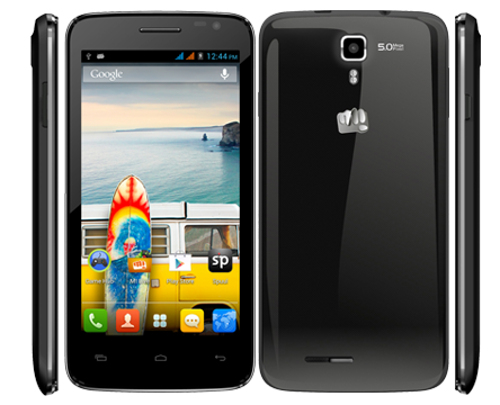
Specifications of Micromax Canvas Juice A177
- 5 Inch Capacitive Touch screen with 854*480 resolution
- 4.2.2 Jelly Bean OS
- MediaTek MT6572 1.2 GHz Dual Core Processor
- 1 GB RAM
- 5 Mega Pixels rear camera and VGA front camera
- Dual SIM support [Dual Standby]
- 3000 mAh Battery
So, I think the device is good and the buyers are happy. Let's make you more happy with the flashing guide.
I am the first to write rooting guide for Canvas Juice and I'm sure it will work. You can trust me! Now let's see the requirements, prerequisites and downloads.
STEP 1:- DOWNLOAD STOCK FIRMWARE HERE.
- YOU NEED NOT TO WORRY ABOUT DRIVERS AS THEY ARE THERE IN FLASH TOOLS.
- YOU NEED TO DISABLE SIGNATURE VERIFICATION IN WINDOWS IN ORDER TO INSTALL THE MTK65XX PRELOADER DRIVERS.
- YOU CAN DO THIS IN WINDOWS 8 BY HOLDING THE SHIFT KEY AND PRESSING THE RESTART BUTTON.
- YOUR ANTIVIRUS MAY DETECT THE DRIVERS AS VIRUS BUT THEY AREN'T.
- SIMPLY TURN OFF YOUR ANTIVIRUS.
INSTALLATION OF DRIVERS:.............................
Installation of the USB VCOM driver:
[1] With USBDeview, clean up your PC from all possible old MTK VCOM entries, then reboot your PC.

[2] Smartphone is switched off, and still dont connect via USB to the PC.
[3] Open Device Manager and leave it open!
[4] Your switched off Smartphone with inserted rechargeable battery via USB connect now on the PC, you should now see a MT65xx preloader in the Device Manager.
(With some MTK6572 Smartphones should be installed without battery. Please before hand inform.)

[5] now launch the Installdriver.exe from the unzipped SP Drivers MTK65XX-Windows 7+Vista+XP drivers folder. Confirm the installation of unsigned drivers

[6] now! (W7 x 64 this confirmation comes later in the manual installation!) After the installation is complete, you have no entry in the Device Manager, it is correctly!


[7] PC reboot!
[8] Open Device Manager and open the switched-off Smartphone via USB to the PC release, now connect (same USB port!)
[9] Now a MediaTek PreLoader USB VCOM should appear for a brief moment in the Device Manager entry!

[10] At the moment the entry double click and click on "Update driver" under the tab "Driver".
[11] With the wizard in the unzipped SP Drivers MTK65XX-Windows 7+Vista+XP drivers navigate and select the folder for your operating system.


FOR WINDOWS 8

- RIGHT CLICK ALL THE .INF FILES THERE AND CLICK INSTALL....
- DRIVERS INSTALLATION DONE....
USING SP FLASH TOOL
- UNZIP Micromax A77 Canvas Juice Stock Firmware.rar TO ANY FOLDER.
- THEN OPEN THE Canvas Juice A77 Flash Tools FOLDER AND IN THAT FOLDER OPEN THE SP Flash Tool FOLDER
- THEN OPEN Flash_Tool.exe AS ADMINISTRATOR.
- First of all open SP Flash Tool, then click Scatter-loading button to load the correct scatter file
MT6572_Android_scatter_emmc.txt(located in the downloaded Rom) for your device and ignore any message that may appear.

- Turn off your phone, remove the battery and replace it after some seconds (and don't turn on the phone).
- Press F9 (or hit Download button) and connect your phone into the computer via USB data cable.
The process will start and a red progress bar will appear.


- After the red progress bar is complete, there will appear a purple progress bar.

- Right after the purple progress bar is complete, a message will appear underneath it:
“Please insert USB cable in x seconds” and then the download will start right away (you will see the yellow progress bar filling up).

- When the yellow bar is complete, you'll get a popup with a green circle and Download OK message,
which means that the process has been successfully terminated.

- You can now safely disconnect your phone and turn it on. The process ends here.
Very important warning: Always make sure that you trust the sources of the ROM you download and know that it is meant for your phone.
After flashing a wrong preloader, your phone will be completely dead (can't be powered on, it will not charge and won't be detected anymore by the computer) and there is no way to recover it.


A Big big thanks to your support and Rom, because of your guide my mobile is alive and in the original state. It was Soft bricked due to my mistake of deleting some lib file and was not booting up. I tried almost every support available on internet, but nothing worked, then I tried your ROM and guide and it worked like a Charm and mobile become alive.
ReplyDeleteFor all those who are facing software issue or have soft bricked Canvas Juice A177, I will recommend to use this Stock Rom and your mobile will become like Factory New mobile. Thanks once again for the posting this Rom
Shakti Agarwal
shakti1174@gmail.com
Pls, help me out. I tried to DL the Mmx A177 juice ROM, from the link provided..but the link is dead. I also have soft bricked my ph after installing Philz custom recovery, the ph does not boot up, and is stuck on the 'Canvas' screen which appears just after the boot animation. Pls, kindly help me and provide a working link. My ph is brand new and yet I can't use it. Pls, pls, pls..help me with a working link of the A177 ROM and SP flash tool which goes with it. I will wait patiently for ur much awaited reply.. Thank you very much to u in advance.
ReplyDeleteCan I use this methode in micromax a77
ReplyDeleteCan I use thid methose in a77? Or give me that link plz
ReplyDeletecan anyone give me the download link of this rom
ReplyDelete